


For at se vores fulde sortiment, priser og opnå den fulde adgang til vores webshop, skal du logge ind.
Log ind på din konto her eller registrer dig som kunde her.
Log ind på din konto her eller registrer dig som kunde her.
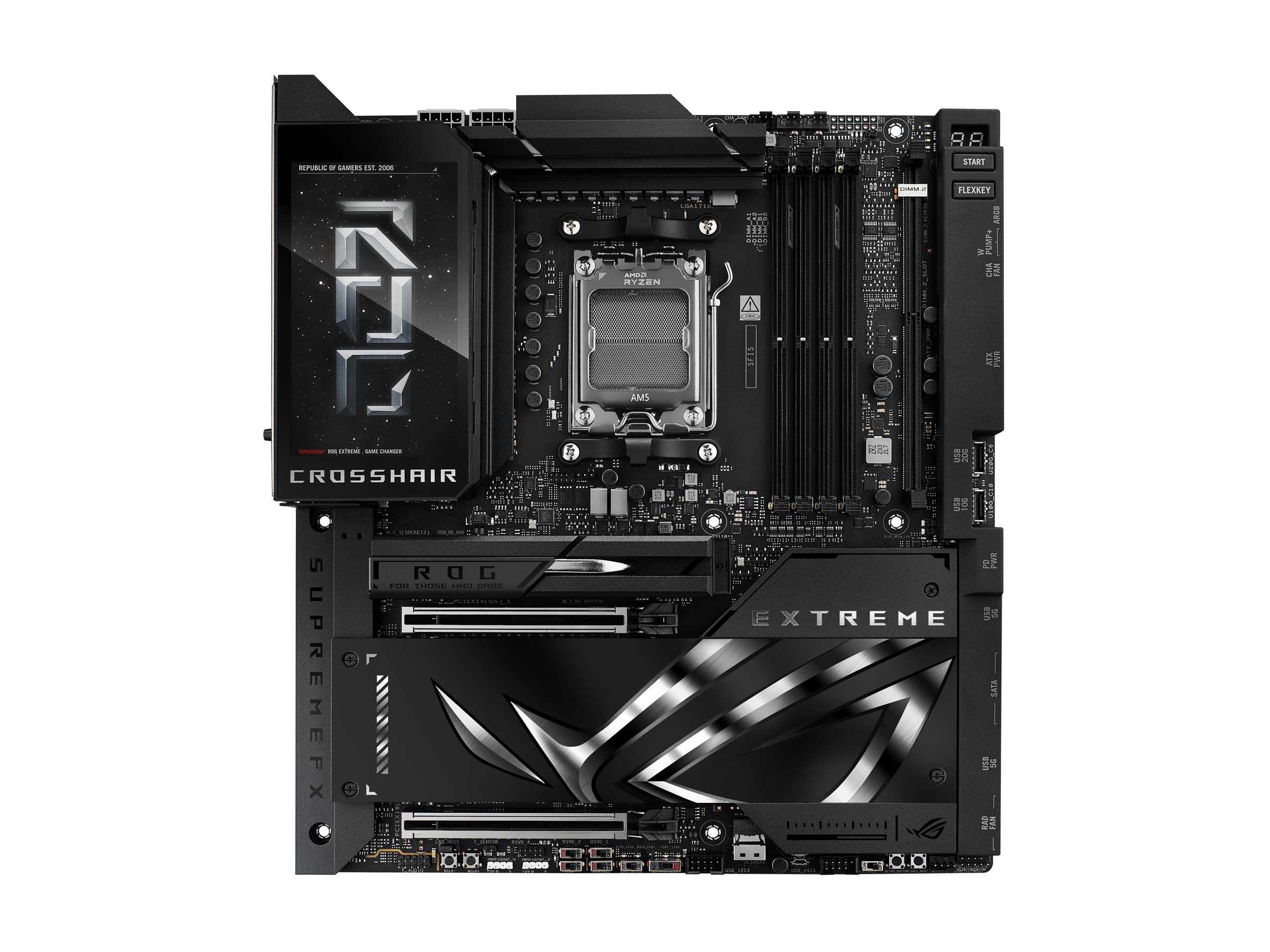
ASUS ROG CROSSHAIR X870E EXTREME ATX Socket AM5 AMD X870E
ASUS ROG CROSSHAIR X870E EXTREME - Bundkort - ATX - Socket AM5 - AMD X870E Chipset - USB4, USB-C 3.2 Gen2, USB 3.2 Gen 2, USB-C 3.2 Gen 2x2, USB 3.2 Gen 1 - Wi-Fi 7, Bluetooth, 5 Gigabit Ethernet, 10 Gigabit LAN - onboard grafik (CPU påkrævet) - HD Audio (8-kanaler)
-
Varenummer 1003267839
Model 90MB1LB0-M0EAY0
Producent ASUSTeK COMPUTER
Gå til producentens hjemmesideEAN 4711387984963
Vægt 5.31 kg
-
Informationer/specifikationer på siden er vejledende og kan uden varsel være ændret af producenten. Der tages forbehold for trykfejl og vejledende billeder.
| Produktbeskrivelse | ASUS ROG CROSSHAIR X870E EXTREME - bundkort - ATX - Socket AM5 - AMD X870E |
| Produkttype | Bundkort - ATX |
| Chipsættype | AMD X870E |
| Processor-socket | 1 x Socket AM5 |
| Kompatible processorer | Ryzen (understøtter Ryzen 7000/8000/9000 Serien) |
| Max RAM-størrelse | 256 GB |
| RAM understøttet | 4 DIMM åbninger - DDR5, ikke-ECC, ECC, on-die ECC, ikke bufferet |
| Lagringsporte | 1 x SlimSAS, 4 x SATA-600, 5 x M.2 |
| USB / FireWire porte | 2 x USB4 + 2 x USB-C 3.2 Gen 2 + 8 USB 3.2 Gen 2 + (1 x USB-C 3.2 Gen 2x2 + 1 x USB 3.2 Gen 2 + 4 x USB 3.2 Gen 1 + 4 x USB 2.0 via samlekasser) |
| Audio | HD Audio (8-kanaler) |
| LAN | 802.11a/b/g/n/ac/ax/be (Wi-Fi 7), Bluetooth 5.4, 5 Gigabit Ethernet, 10 Gigabit Ethernet |
| Generelt | |
|---|---|
| Chipsættype | AMD X870E |
| Kompatible processorer | Ryzen (understøtter Ryzen 7000/8000/9000 Serien) |
| Max antal processorer | 1 |
| Processor-socket | Socket AM5 |
| Produkttype | Bundkort - ATX |
| Understøttet RAM | |
| Bus Clock | 4000 MHz (O.C.), 4100 Mhz (O.C), 4500 MHz (O.C.) |
| Egenskaber | Dobbelt kanal hukommelses arkitektur, AMD EXPO-teknologi |
| Maks. størrelse | 256 GB |
| Registreret eller buffer | Ikke bufferet |
| Teknologi | DDR5 |
| Understøttet RAM-integritetskon | Ikke-ECC, ECC, on-die ECC |
| Audio | |
| Audio codec | SupremeFX ALC4082 / ESS ES9219 |
| Overensstemmelsesstandarder | High Definition Audio, Dolby Atmos |
| Type | HD Audio (8-kanaler) |
| LAN | |
| Netværk controller | Marvell AQtion |
| Netværks interfaces | 802.11a/b/g/n/ac/ax/be (Wi-Fi 7), Bluetooth 5.4, 5 Gigabit Ethernet, 10 Gigabit Ethernet |
| Ekspansion / Konnektivitet | |
| Ekspansionsåbninger | 1 x CPU | 4 x DIMM 288-pins | 2 x PCIe 5.0 x16 | 2 x M.2 socket (22.110 M.2 Key M-åbning) | 1 x M.2 socket (2280 M.2 åbning) | 2 x DIMM.2 sokkel (22.110 M.2 Key M-åbning) | 1 x PCIe 4.0 x4 (SlimSAS) |
| Grænseflade (lagring) | SATA-600 -stikforbindelser: 4 x 7pin Seriel ATA - RAID 0 / RAID 1 / RAID 10 / RAID 5 | PCIe 5.0 -stikforbindelser: 3 x M.2 | PCIe 4.0 -stikforbindelser: 2 x M.2 | PCIe 4.0 -stikforbindelser: 1 x SlimSAS |
| Interface | 2 x USB4 | 2 x USB-C 3.2 Gen 2 | 8 x USB 3.2 Gen 2 | 1 x HDMI | 1 x LAN (5Gigabit Ethernet) | 1 x LAN (10Gigabit Ethernet) | 1 x audio linje-ud | 1 x mikrofon | 1 x SPDIF-ud |
| Interne interfaces | 1 x USB-C 3.2 Gen 2x2 - intern stik | 1 x USB 3.2 Gen 2 - intern stik | 4 x USB 3.2 Gen 1 - intern stik | 4 x USB 2.0 - intern stik | 1 x audio - intern stik |
| RAID-egenskaber | AMD RAID Xpert2 Technology |
| Strømkontakter | 24-pin hovedstrøm-konnektor, 2 x 8-pins ATX12V stikforbindelser, 8-pins PCI Express strøm-stikforbindelse |
| Egenskaber | |
| BIOS-egenskaber | UEFI BIOS, ASUS EZ Flash 3, ASUS UEFI BIOS EZ Mode |
| BIOS-type (Basic Input/Output System) | AMI |
| Hardware egenskaber | ASUS Enhanced Memory Profile (AEMP), CrashFree BIOS 3, Preboot eXecution Environment (PXE), Clear CMOS Button, BIOS FlashBack-knap, 10K Black Metallic Capacitors, ASUS Aura Sync, ASUS Extreme Engine Digi+, ASUS Extreme OC Kit, ASUS EZ DIY, ASUS ProCool II, ASUS Q-Connector, ASUS Q-Design, ASUS SafeDIMM, ASUS SafeSlot, FlexKey-knap, M.2 kølelegeme, M.2 kølelegemebagplade, M.2 Q-Latch, M.2 Q-Release, M.2 Q-Slide, metalbagplade, MicroFine Alloy Chokes, PCIe Slot Q-Release, præmonteret I/O-skjold, Q |
| Sov/ Vågn | Aktivering af LAN (wake on LAN = WOL), vågn på PME |
| Diverse | |
| Bredde | 30.5 cm |
| Dybde | 24.4 cm |
| Med software | Adobe Creative Cloud (gratis prøve), AIDA64 Extreme (1 års 'licens), Armoury Crate, ASUS AURA Creator, ASUS DriverHub, ASUS Fan Xpert 4, ASUS GlideX, HWiNFO, ROG CPU-Z, ROG GameFirst Utility, TurboV Core, USB Wattage Watcher, WinRAR (40 days trial), Drivers & Utilities |
| Medfølgende ledninger | 4 x Seriel ATA kabel |
| Udstyr inkluderet | 1 til 2 ARGB LED-opdelerkabel, 1 til 3 ARGB LED-opdelerkabel, 1 til 4 blæseropdelerkabel, 3 i 1 termistor-kabelpakke, ROG DIMM.2 med kølelegeme, M.2 pad-pakke til ROG Q-DIMM.2, 2 x termisk pude til ROG Q-DIMM.2, ROG ventilator kit, ASUS-blæserholder, termisk pude til M.2 SSD, ASUS Wi-Fi Q-antenna, Q-Connector, ROG-logoplademærkat, ROG-skruetrækker, ROG VIP-kort, M.2 Q-Slide, 5 x M.2 backplade gummipakke, ROG flaskåbner, USB-drev |
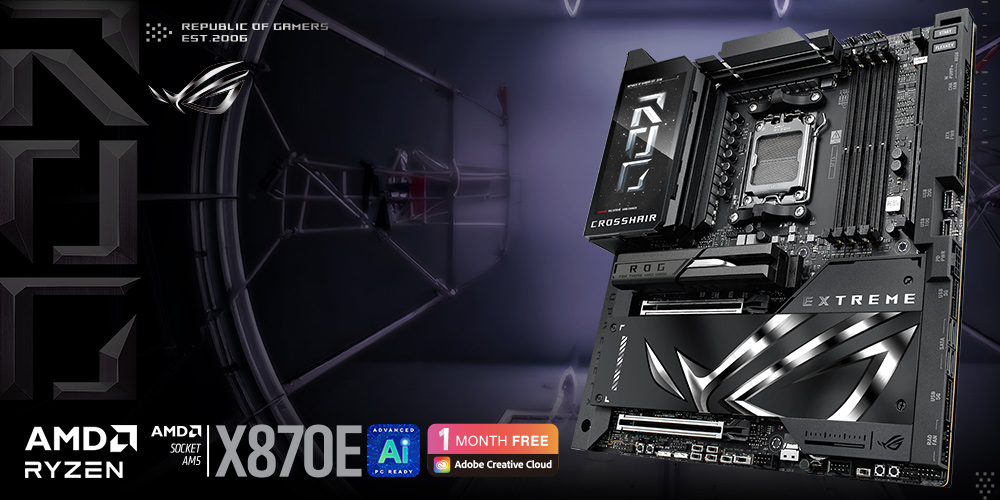
The ROG Crosshair X870E Extreme is the flagship AMD Ryzen™ 9000 series motherboard, designed for the most discerning users. It provides the ultimate foundation for AM5 CPUs, DDR5 memory, and PCIe® 5.0 components to ensure maximum performance and future-readiness. Its comprehensive connectivity includes USB4®, and the integrated 5-inch LCD offers a unique way to monitor system performance or add a touch of personalized style.Click to check our X870E/X870 Motherboards Guide
.jpg)
- Ready for Advanced AI PCs: Designed for the future of AI computing, with the power and connectivity needed for demanding AI applications
- AMD AM5 Socket: Ready for AMD Ryzen™ 9000, 8000 and 7000 Series Desktop Processors
- Intelligent Control: ASUS-exclusive AI Overclocking, AI Cooling II, AI Networking II and AEMP to simplify setup and improve performance
- ROG Overclocking Technologies: Dynamic OC Switcher, Core Flex, Asynchronous Clock and PBO Enhancement
- Robust Power Solution: 20(110A)+2(110A)+2 power stages with ProCool II power connectors, MicroFine alloy chokes and premium metallic capacitors
- Optimized Thermal Design: Massive heatsinks integrated with the I/O cover, joined by two U-shaped heatpipes and connected to the power stages with high-conductivity thermal pads, and 3D VC M.2 heatsink for one PCIe® 5.0 M.2 slot
- Latest M.2 Support: Three onboard PCIe® 5.0 M.2 slots, plus two PCIe® 4.0 M.2 slots via ROG Q-DIMM.2, all with substantial cooling solutions
- Abundant Connectivity: Dual USB4® Type-C® ports, one USB 20Gbps Type-C front-panel connector with Quick Charge 4+ up to 60W and USB Wattage Watcher, one USB 10Gbps Type-C® front-panel connector, ten additional USB 10Gbps ports, SlimSAS connector with PCIe® 4.0 x4 support, two PCIe® 5.0 x16 SafeSlots, HDMI™ port
- High-Performance Networking: On-board Wi-Fi 7 (802.11be) with ASUS WiFi Q-Antenna, Realtek 5Gb Ethernet and Marvell® AQtion 10Gb Ethernet
- DIY Friendly Design: M.2 Q-Release, New M.2 Q-Latch, M.2 Q-Slide, Q-Antenna, PCIe® Slot Q-Release Slim, BIOS Q-Dashboard, Q-Code, Q-LED, FlexKey button, Start button, BIOS FlashBack™ button, Clear CMOS button and pre-mounted I/O shield
- Immersive Audio: ROG SupremeFX ALC4082 codec with ESS® ES9219 Quad DAC for up to 32-Bit/384 kHz playback
- Unmatched Personalization: Full Color 5” LCD Screen, two Gen 2 ARGB headers, and a 6-pin Gen 2 ARGB header to support two Gen 2 ARGB headers, all configurable with ASUS-exclusive Aura Sync RGB lighting
- Renowned Software: ASUS DriverHub, Dolby Atmos®, exclusive 1-year Internet Security subscription, TurboV Core, GlideX, HWiNFO and bundled 1-year AIDA64 Extreme subscription
ASUS AI Advisor
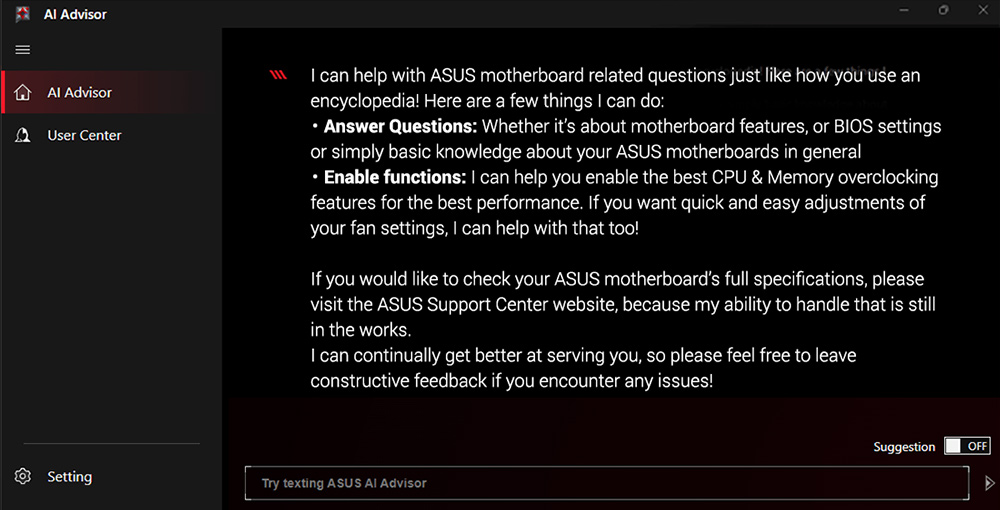
ASUS AI Advisor is an ASUS technical expert that's always available to answer your questions. Owners of compatible ASUS motherboards can interact with this AI-powered technology using natural language to learn more about their hardware. For DIY beginners, it can provide easy-to-understand explanations of one-click optimization features like AI Overclocking and fan speed tuning, and for seasoned PC-building veterans, it can offer guidance and instructions on the latest features offered by ASUS.* Availability of ASUS AI Advisor may vary by region.
.jpg)
.jpg)
AI OVERCLOCKING
Tuning is now faster and smarter than ever before. ASUS AI Overclocking profiles the CPU and cooling to predict the optimal configuration and push the system to its limits. Predicted values can be engaged automatically or used as a launching ground for further experimentation.AI COOLING II
Balance the thermals and acoustics of any build with a single click. A proprietary ASUS algorithm slashes unnecessary noise while running a quick stress test, and then monitors CPU temperatures to dynamically adjust fans to optimal speeds..jpg)
.jpg)
Traffic Monitor
Armoury Crate's Traffic Monitor tracks your current WiFi channel usage. Move to a less congested channel by clicking the “Channel Switch” button* for improved network performance.*The "Channel Switch" function requires pairing with an ASUS router. If not paired with an ASUS router, the channel change process can be performed in the "Router IP" section of the Traffic Monitor.
Fast Check
Armoury Crate’s Fast Check empowers users to rapidly detect WiFi signal strength.jpg)
.jpg)
Direction Finder
Armoury Crate’s Direction Finder* helps users detect the optimal antenna orientation for achieving the best WiFi signal strength.*The Direction Finder is only compatible with connections in the 5GHz and 6GHz bands
Gamefirst
GameFirst is now integrated into Armoury Crate for an even better user experience. GameFirst optimizes networking performance by allocating bandwidth in real time, based on intelligent algorithms designed for various application customizable usage scenarios and corresponding learning algorithms. The latest update includes dedicated support for NVIDIA® GeForce NOW to ensure the lowest latency possible during intense game streamingcloud gaming sessions. To provide a better user’s experience, GameFirst is now integrated into Armoury Crate..jpg)
.jpg)
DYNAMISK OC-OMKOPPLARE
Dynamic OC Switcher maximizes CPU performance by letting you set current and temperature thresholds to automatically switch between a manual overlock for heavy multithreaded workloads and Precision Boost Overdrive for single-threaded tasks. The latest Overclocking Load Guard has an enhanced instantaneous current protection mechanism to prevent users from experiencing system crashes during overclocking.CORE FLEX
Core Flex empowers you to smash limits farther than ever before by letting you control clock, power, and thermals in creative new ways. In its simplest form, you can maximize base clock during lighter loads and set breakpoints to gradually reduce CPU core frequency as temperature or current increases. But the system is extremely adaptable, supporting multiple user-controlled functions that can manipulate power, current, and temperature limits independently so that you can bend CPU performance to your will..jpg)
.jpg)
DDR5 DOMINATION
Thanks to improved signal routing, now enthusiast-grade kits can be driven far beyond the 9 GT/s mark on the ROG Crosshair >X870E Extreme*.For those who want to fly past stock DDR5 speeds, the ROG Crosshair X870E Extreme is primed and ready for enthusiast-grade kits courtesy of vast AMD EXtended Profiles for Overclocking (EXPO) support. Seasoned veterans can further tweak performance via the extensive array of settings in the UEFI.*Memory overclocking may vary between CPU series. Please refer to the spec table for detailed information.
AEMP
AEMP automatically detects the memory chips on your kit and then presents optimized frequency, timing and voltage profiles that you can effortlessly apply to unleash performance..jpg)
NITROPATH DRAM TECHNOLOGY
NitroPath DRAM Technology provides enhanced DDR5 memory performance. Shorter gold finger pins and optimized signal pathways ensure faster data transfers between your DRAM and CPU, allowing for greater memory overclocking headroom and stability. These reinformed DRAM slots are also better prepared to withstand the wear and tear of the RAM installation process than traditional slot designs, perfect for enthusiasts who keep their system upgraded with the fastest kits available.* The feature is patented. Images are for illustrative purposes only. Actual size and length may vary with DDR5 connector.
.jpg)
TEAMED POWER ARCHITECTURE
.jpg)
COOLER BY DESIGN
THREE ONBOARD M.2 SLOTS
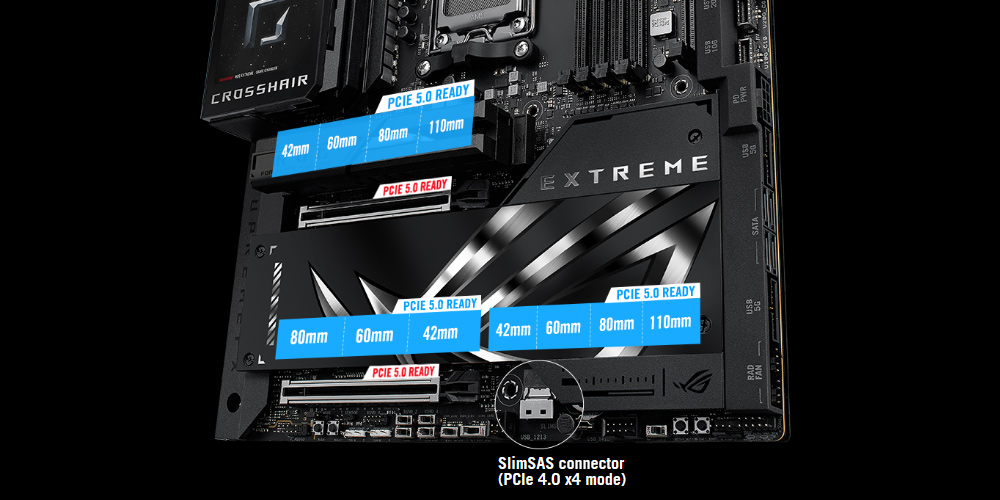
The ROG Crosshair X870E Extreme features three onboard PCIe 5.0 M.2 slots, which offer blistering 16 GB/s speeds.It also features a SlimSAS Connector, which supports PCIe 4.0 x4 mode via a transfer cable. The cable is purchased separately.EXPANSION SLOTS
Both x16 expansion slots offer PCIe 5.0 with incredible speeds up to 64 GB/s for compatible devices, fully supporting next-gen graphics cards. To bear the weight of massive graphics cards, they are also protected with SafeSlot retention brackets which can be released easily, thanks to PCIe Slot Q-Release Slim..jpg)
ROG Q-DIMM.2
The ROG Q-DIMM.2 expansion card lets you easily mount two PCIe 4.0 M.2 drives next to the memory module slots, where the card’s large heatsinks convect heat directly into the path of chassis airflow. (M.2 drive not included.).jpg)
NETWORKING
ASUS WiFi Q-Antenna
Dual transceivers support the 2.4, 5 and 6 GHz bands to enable faster throughput, with directional sensitivity to improve signal quality and cover greater distances.Wireless Signal Reception Improvement
Versus previous-generation antenna
Up to+6%6 GHz
Up to+18%5/2.4 GHz
.jpg)
.jpg)
PCIE® SLOT Q-RELEASE SLIM
With PCIe® Slot Q-Release Slim, simply tilt the card toward the latching mechanism to automatically unlock it from the PCIe slot. This makes upgrades and maintenance easier than ever before. Users will no longer need to fiddle with a tricky latch or even press a button to release their graphics card from the slot.M.2 Q-Release
The M.2 heatsink features a convenient switch* to quickly remove it, eliminating the need for tiny screws during SSD installation. Its strong locking mechanism also provides a snug contact surface, helping to ensure reliable heat dissipation for your SSD.*Switch may be a lever or button, depending on motherboard model.
.jpg)
.jpg)
.jpg)