|
Produktbeskrivelse
|
Dell Pro Micro QCM1250 - mikro - AI PC - Core i5 i5-14500T 1.7 GHz - 8 GB - SSD 512 GB
|
|
Type
|
Personal computer - mikro - AI PC
|
|
Bundled Services
|
1 års Basic Onsite (AT, DE - 2 år)
|
|
Processor
|
Intel Core i5 (14. Gen) i5-14500T / 1.7 GHz (op til 4.8 GHz, (14-core)
|
|
Processor, hovedegenskaber
|
20 Threads, 35W CPU
|
|
Cachehukommelse
|
24 MB
|
|
Cache pr. processor
|
24 MB
|
|
RAM
|
8 GB (installeret) / 64 GB (maks.) - DDR5 SDRAM - ikke-ECC
|
|
Harddisk
|
SSD 512 GB - PCI Express 4.0 - M.2 - NVM Express (NVMe)
|
|
Optisk lagring
|
Intet optisk drev
|
|
Grafik controller
|
Intel UHD Graphics 770 Fælles videohukommelse (UMA)
|
|
Netværk
|
1GbE, Bluetooth, 802.11a, 802.11b/g/n, Wi-Fi 5, Wi-Fi 6E
|
|
Effekt
|
(50/60 Hz)
|
|
Med OS
|
Windows 11 Pro
|
|
Med software
|
Aktiver din Microsoft 365 for en 30-dages prøveperiode
|
|
Farve
|
Sort
|
|
Dimensioner (B x D x H)
|
3.6 cm x 17.8 cm x 18.2 cm
|
|
Vægt
|
1.16 kg
|
|
Pristype
|
Build To Stock (BTS)
|
|
Miljømæssige standarder
|
ENERGY STAR kvalificeret EPEAT Gold
|
|
Karbonfodaftryk
|
77.6 kg karbonudledning
|
Effective Friday, July 3, 2026, the office will close at 4:30 PM on Fridays. From Monday to Thursday, Sales contact hours remain unchanged from 9:00 AM to 5:00 PM, while contact hours for Accounting, Purchasing, and RMA remain unchanged in general.
To gain full access to our webshop, find our entire product range and see our prices, you need to be logged in.
Log in to your account here or sign up as a customer here.
DELL Pro QCM1250 Micro PC i5-14500T Intel Core i5 8GB 512GB Windows 11 Pro
Dell Pro Micro QCM1250 - AI PC - mikro Core i5 i5-14500T / op til 4.8 GHz - RAM 8 GB - SSD 512 GB - NVMe - UHD Graphics 770 - Gigabit Ethernet, Bluetooth, IEEE 802.11ax (Wi-Fi 6E) - Win 11 Pro - skærm: ingen - sort - BTS - med 1 års Basic Onsite (AT, DE - 2 år)
Dell Pro Micro QCM1250 er en kompakt løsning til brugere, der ønsker effektiv ydeevne i et lille format. Denne pc er udstyret med en Intel Core i5-processor med 14 kerner og kan håndtere krævende opgaver, samtidig med at den er energieffektiv. Den installerede SSD giver hurtig adgang til data, hvilket bidrager til en generelt jævn brugeroplevelse, uanset om det er til forretnings- eller kreative formål.
Product no:
1003430044
Model:
NF51R
EAN:
5397184936191
Brand:

Weight:
2.94 kg
Specifications

Features
Kompakt design
Dell Pro Micro QCM1250 har en lille formfaktor, der gør den nem at placere i trange rum, hvilket gør den velegnet til både kontor- og hjemmemiljøer.
Effektiv processorkraft
Med en 14-core Intel Core i5-processor håndterer denne computer nemt multitasking og sikrer jævn ydeevne for forskellige applikationer.
Hurtig SSD-lagring
Med en installeret PCI Express NVMe SSD giver enheden hurtig dataadgang og hurtige opstartstider, hvilket øger produktiviteten.
Forbedrede tilslutningsmuligheder
Dette system er udstyret med flere USB-porte, HDMI- og DisplayPort-grænseflader og understøtter en bred vifte af perifere enheder og eksterne skærme.
Robuste sikkerhedsfunktioner
Denne model tilbyder beskyttelse mod tyveri og indtrængen via en chassisindtrængningskontakt og Kensington-sikkerhedsslot, hvilket sikrer, at data forbliver sikre.
Media
.jpg)
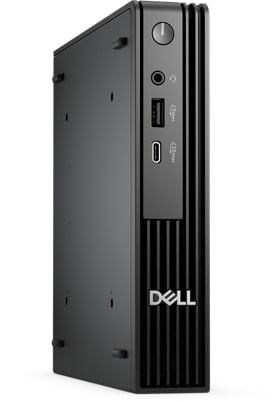
Dell Pro Micro Desktop
Big power. Small footprint.Ultracompact desktop with power-efficient performance and Intel® Core™ Ultra (Series 2) processors for AI workloads or Intel® Core™ (14th Gen) processors for everyday business tasks.

Intel® Core™ Processors - Work, play, and create as quickly and seamlessly as your heart desires.
- Faster performance empowering people to focus, create, and connect like never before
- Raising the bar on connectivity
- Video editing just under a minute
.jpg)
.jpg)
.jpg)
.jpg)
3D / Augmented Reality
Stay ahead with the power of AI
Select from two adaptable configurations to suit your needs—Intel® Core™ Ultra processors (Series 2) for AI workloads or Intel® Core™ processors (14th Gen) for everyday business tasks.
.jpg) 0:30
0:30Which configuration is right for you?
With versatile mounting options, Dell Pro Micro, available with AI PC options, offers maximum productivity in an ultra-compact desktop. Flexible “All-in-One” solutions with the Dell Pro Micro All-in-One Stand and custom mounts keep your desk clutter-free without impacting performance. See which option is best for you:
.jpg)
Dell Pro Micro
Features the latest Intel® Core™ Ultra processors, up to Ultra 7 for AI-enhanced productivity and Intel® Core™ processors, up to i7. Includes 5 USB-A ports and 1 USB-C port, 1 HDMI port supporting up to 4K, 1 DisplayPort supporting up to 5K, and up to dual M.2 SSD slots.Next-level AI
The Dell Pro Micro delivers power-efficient performance for demanding workloads with AI PC options featuring Intel® Core™ Ultra desktop processors (Series 2) and three-tier multi-processing architecture combining CPU, GPU and dedicated NPU. This setup ensures AI-driven apps run faster and smoother across any project.
.jpg)
.jpg)
.jpg)
.png)
Bring AI to your PC
Dell delivers the industry's most comprehensive AI toolkit leveraging NPU technology[1]. Dell Pro AI Studio brings AI directly to your device, delivering cloud-like seamlessness without the hefty price tag. Set up and deploy AI with ease in any workplace.Increased efficiency
Let your desktop work smarter, not harder, with enhanced AI collaboration that uses up to 58% less processor power during Zoom calls with AI background effects[2].Faster AI performance
Get up to 50% faster AI performance with Adobe After Effects’ AI Scene Edit Detection[3] to speed up your editing workflow and unlock more time for creativity, all while delivering stunning resultsTop AI PC security
Work securely with effortless management on the world's most secure and manageable commercial AI PCs[4]. Built to combat modern cyberattacks, these systems feature advanced hardware and firmware protections, integrated validation for all driver and BIOS updates, and a published schedule for driver and download releases . And, with Intel Pro® options, IT departments get multilayer security, remote management and reliable stability.
Purposeful design
The Dell Pro Micro seamlessly blends style and functionality, offering a versatile design that's efficient in enhancing performance during long workdays. Built for durability, all Dell Pro desktops undergo rigorous military-grade testing[5] to deliver reliable performance you can count on.
.jpg) 0:06
0:06Cooler and quieter
Reengineered with an enhanced thermal design and additional venting on the chassis, it delivers up to 8% cooler and up to 32% quieter operation[6]..png)
Fits into any workspace
Keep your workspace clutter free with a range of optional mounts and stands. You can set up a complete all-in-one system by attaching a Dell USB-C Hub monitor to the Dell Pro Micro All-in-One stand, or use it as part of a Dell video conferencing setup.
With the optional Type-C module, you can power your PC (up to 100W) using just a single USB-C cable connected to a compatible Dell USB-C Hub monitor.
Power that drives your workflow
Fast, seamless and future-proof, the Dell Pro Micro is built to meet your needs today and for years to come.
.jpg)
Multi-monitor setup
Expand your screen setup with integrated graphics, allowing you to use up to four displays at once[7].
Upgradable
Enhance your desktop’s capabilities with optional DP and HDMI ports supporting up to 5K resolution[8] for stunning visual quality, 5GbE Optical Fiber (Peer-to-Peer)[9]and Wi-Fi[10].
Fast storage
Handle heavy workloads with up to 64GB of DDR5 memory running at up to 6400 MT/s, and up to two M.2 Gen 4 SSDs[11].
Convenient connectivity
Quickly connect your existing peripherals using the front USB-C and USB-A ports, as well as an array of rear ports.
Modern device management
.jpg)
Single BIOS strategy
Streamline PC deployment and simplify fleet management with one unified BIOS across Dell Pro Micro, Slim and Tower with Intel® processors.Built to perform
Dell Pro desktops are built for reliability and durability, with less than 1% requiring service in their first year.[12]Dell Trusted Update Experience
We package the latest BIOS, drivers and firmware versions for our customers – with Dell-exclusive capabilities to simplify PC management..jpg)
Simplify IT
We offer the most secure [13] and manageable [14] commercial PCs, along with modern lifecycle services and solutions to make IT management a breeze.Dell Security
Reduce the attack surface and improve cyber resilience with Dell Trusted Workspace. Supply chain security and BIOS-level tamper detections help maintain device trust while partner software provides advanced threat protection for endpoints, network and the cloud.Dell Management
Manage your PCs over the cloud, in conjunction with Microsoft Intune, via the Dell Management Portal.Dell APEX
APEX PC-as-a-Service[15] unlocks capital so you can invest in AI-ready PCs with no upfront investment. Seamlessly deploy, secure, manage, support and responsibly retire devices as part of your subscription.
.jpg)
Advancing sustainability
Compact in size, big on sustainability. This small but powerful desktop is designed with sustainability in mind, featuring recycled materials while meeting key environmental standards.
Innovative materials
The Dell Pro Micro is crafted with up to 59% post-consumer recycled plastic, closed loop plastic and 13% recycled ocean-bound plastic[16].
Dell continues to lead the industry in the use of 50% recycled steel in the chassis of this desktop[17]. Plus, it ships in packaging made with up to 100% [18] recycled content or renewable content[18].
Reduce e-waste when modernizing your tech
We can help you responsibly and securely retire your legacy IT equipment, regardless of brand, while addressing your sustainability goals.
Raising environmental standards
This product is certified ENERGY STAR® and registered EPEAT Gold with Climate+. Meaning it meets key sustainability criteria for energy efficiency and climate impact[19].
.png)
.png)
.jpg)
Accelerate business success with Copilot and Windows 11 Pro
Industry-leading AI. Powerful cybersecurity. Designed for business.
AI-powered multi-tasking mastery for a new way of working with Windows 11 Pro. With features like Copilot in Windows[20], get better answers, grow your skills, and effortlessly optimise workflows. Windows 11 Pro on Dell PCs come with the latest advances in security and AI delivered conveniently to your desktop. Benefit from AI-enhanced efficiency, performance, and security today, and innovate to take on new challenges tomorrow.
Ports and slots
.png)
.png)
Front side
1. Power Button3. USB 3.2 Gen 1 (5 Gbps) Type-A Port
Rear side
5. Optional Wireless Antenna11. Kensington Security Cable Slot and Padlock Ring
14. Power-cord Connector Port
Dimensions and weight
.png)
Starting weight: 1.16 kg (2.56 lb)[22]
Regulatory Product Compliance & Environmental
Dell Technologies is committed to compliance with the laws and regulations in each country into which the company ships it's products. Dell products are designed and tested to meet the appropriate worldwide standards for Product Safety, Electromagnetic Compatibility, Ergonomics, and other regulatory compulsory requirements when used for their intended purpose.
In addition, Dell products are developed with design for the environment in mind. Our environmental stewardship program drives conservation of product energy consumption, develops methods to reduce or eliminate materials for disposal, prolongs product life span, and provides effective and convenient equipment recovery solutions.
1. Based on Dell internal testing against publicly available comprehensive information, November 2024.
2. Based on Intel testing, October 2024. As measured by processor power during 1x1 Zoom call with background blur on NPU. Results may vary. See www.intel.com/PerformanceIndex for workloads and configurations. Results may vary.
3. Based on Intel testing, October 2024. As measured by Adobe After Effects AI Scene Edit Detection feature. Results may vary. See www.intel.com/PerformanceIndex for workloads and configurations. Results may vary.
4. Most secure is based on Dell internal analysis, October 2024. Applicable to PCs on Intel processors. Not all features available with all PCs. Additional purchase required for some features. Validated by Principled Technologies. A comparison of security features, April 2024. Most-manageable commercial PCs when comparing the systems management capabilities of Dell Update Processes, Dell Manageability Solution capabilities and integrations with 3rd Party Management Solutions, with competitor update processes, systems management solution capabilities and integrations with 3rd party management solutions. 3rd Party Management Solution - Microsoft Intune, is a separate purchase. Based on Dell internal analysis, January 2025.
5. Based on third-party testing conducted in Jan, 2025. Passed 14 MIL-STD-810H tests. Actual results may vary; testing results do not guarantee performance under test conditions. Dell does not represent that this product meets United States Department of Defense requirements for military use.
6. Versus the previous generation. Based on Dell internal testing, January 2025.
7. Support for (4) displays is enabled by daisy-chaining via DisplayPort 1.4a. Maximum display resolution and refresh rates are contingent on selected video port specifications and may be limited by each additional display connected by daisy-chain. This is the expected display resolution when connecting 1 or more of your display(s) to:
One Native DisplayPort 1.4a – One display: up to 5120 x 3200 @60Hz resolution -or- – Two displays via MST/daisy-chain: up to 3840 x 2160 @60Hz resolution -or- – Three displays via MST/daisy-chain: up to 2560 x 1600 @60Hz resolution -or- – Four displays via MST/daisy-chain: up to 2560 x 1440 @60Hz resolution;
Two Native DisplayPort 1.4a – Two displays: up to 5120 x 3200 @60Hz -or- – Three displays: one up to 5K @60Hz resolution, two via MST/daisy-chain: up to 3840 x 2160 @60Hz resolution -or- – Four displays via MST/daisy-chain: up to 2560x1440 @60Hz resolution;
Three Native DisplayPort 1.4a – Three displays: up to 5120 x 3200 @60Hz resolution –or- – Four displays: two up to 5K resolution, two via MST/daisy-chain: up to 3840 x 2160 @60Hz resolution
8. Optional DisplayPort supports up to 8K resolution, HDMI supports up to 5K resolution; please refer to technical specs for details.
9. Supports up to 5Gbps connectivity via peer-to-peer transmission. Actual speed via network depends on equipment compatibility, requiring both transceiver and switch at the same maximum speed.
10. Wi-Fi 7 certified products will roll out in accordance with the Wi-Fi Alliance certification schedule throughout 2024. Wi-Fi 7 requires the latest Wi-Fi Alliance certification, Windows HLK certified device driver, hardware update, supported Windows OS version and compatible router. Wi-Fi 7/ 6E connectivity (6 GHz) with Windows 11 is limited and will leverage prior generation of Wi-Fi 6E/ Wi-Fi 6 speeds until drivers are available and hardware adoption increases. Ubuntu OS will not support Wi-Fi 7 and will operate on Wi-Fi 6E/6 speeds when configured for Wi-Fi 7. Router requires a separate purchase. Wi-Fi 7/ 6E (6 GHz) connectivity is only available in select locations. Check availability with your service provider. The Bluetooth wireless card version may vary depending on the operating system that is installed on your computer.
11. Up to two M.2 Gen 4 SSD applies to Pro Micro Plus and Pro Micro with Intel Core Ultra processors. Up to 1 x Gen 4 and 1 x Gen 3 SSD on Pro Micro with Intel Core processors.
12. Based on Dell Quality Intelligence (Qi) tool - Dell Internal Analysis, January 2025.
13. Based on Dell internal analysis, October 2024. Applicable to PCs on Intel processors. Not all features available with all PCs. Additional purchase required for some features. Validated by Principled Technologies. A comparison of security features, April 2024.
14.Based on Dell internal analysis, January 2025. Most-manageable commercial PCs when comparing the systems management capabilities of Dell Update Processes, Dell Manageability Solution capabilities and integrations with 3rd Party Management Solutions, with competitor update processes, systems management solution capabilities and integrations with 3rd party management solutions. 3rd Party Management Solution - Microsoft Intune, is a separate purchase.
15.Payment solutions provided and serviced by Dell Financial Services L.L.C. or its affiliate or designee (“DFS”) for qualified customers. Offers may not be available or may vary in certain countries. Where available offers may be changed without notice and are subject to product availability, applicable law, credit approval, documentation provided by and acceptable to DFS and may be subject to minimum transaction size. Offers not available for personal, family or household use. Dell Technologies and the Dell Technologies logo are trademarks of Dell Inc. Restrictions and additional requirements may apply to transactions with governmental or public entities. Dell APEX PCaaS: At the end of the contract, the customer may renew the contract or return the equipment to DFS.
16.Based on internal analysis, January 2025. Percentage is based on system plastic weight. Post-consumer recycled plastic: 45%, Closed-Loop ITE derived plastic: 14%. Recycled ocean- bound plastic applies to the fan-housing.
17.Percentage applies to total steel weight in the chassis. Includes OptiPlex Micro, OptiPlex Micro Plus, OptiPlex Tower, OptiPlex SFF , OptiPlex SFF Plus, Dell Pro Micro, Dell Pro Micro Plus, Dell Pro Tower, Dell Pro Slim and Dell Pro Slim Plus. Based on internal analysis, January 2025.
18.Contains 44.4% recycled content and 57.9% renewable materials. Renewable materials in the form of sustainably forested materials. Percentages may vary slightly by region[and formfactor]. Excludes optional items added to order and included in the box.
19.Based on internal analysis, January 2025.EPEAT registered where applicable. EPEAT registration varies by country. See www.epeat.net for registration status by country.
20.Copilot is only supported in selected regions.Timing of feature delivery and availability varies by market and device. Use Copilot with a Microsoft Account or use Copilot with commercial data protection at no additional cost by signing into a work or school account (Microsoft Entra ID) with Microsoft 365 E3, E5, F3, A3 or A5 for faculty, Business Premium, and Business Standard. Coming to more Entra ID users over time.
21.Supports up to 5Gbps connectivity via peer-to-peer transmission. Actual speed via network depends on equipment compatibility, requiring both transceiver and switch at the same maximum speed.
22.Weights vary depending on configuration and manufacturing variability.
.jpg)
Intel®
Ultrabook, Celeron, Celeron Inside, Core Inside, Intel, Intel Logo, Intel Atom, Intel Atom Inside, Intel Core, Intel Inside, Intel Inside Logo, Intel vPro, Itanium, Itanium Inside, Pentium, Pentium Inside, vPro Inside, Xeon, Xeon Phi, Xeon Inside, and Intel Optane are trademarks of Intel Corporation or its subsidiaries in the U.S. and/or other countries.Support
Se Dell seneste FAQ - løser 90 % af typiske problemer
http://www.dell.com/support/home/dk/da/dkbsdt1/?c=dk&l=da&s=bsd&~ck=mn
Teknisk support: 70 23 01 82
Kontakt Dell på 70 23 01 82
Har du dit service tag, så benyt formularen så bliver du videre sendt til den rigtige afdeling.
http://www.dell.com/support/incidents/dk/da/dkdhs1/Phone/Phonetagentry
http://www.dell.com/support/home/dk/da/dkbsdt1/?c=dk&l=da&s=bsd&~ck=mn
Teknisk support: 70 23 01 82
RMA
For håndtering og oprettelse af Dell garantiKontakt Dell på 70 23 01 82
Har du dit service tag, så benyt formularen så bliver du videre sendt til den rigtige afdeling.
http://www.dell.com/support/incidents/dk/da/dkdhs1/Phone/Phonetagentry