


Log in to your account here or sign up as a customer here.
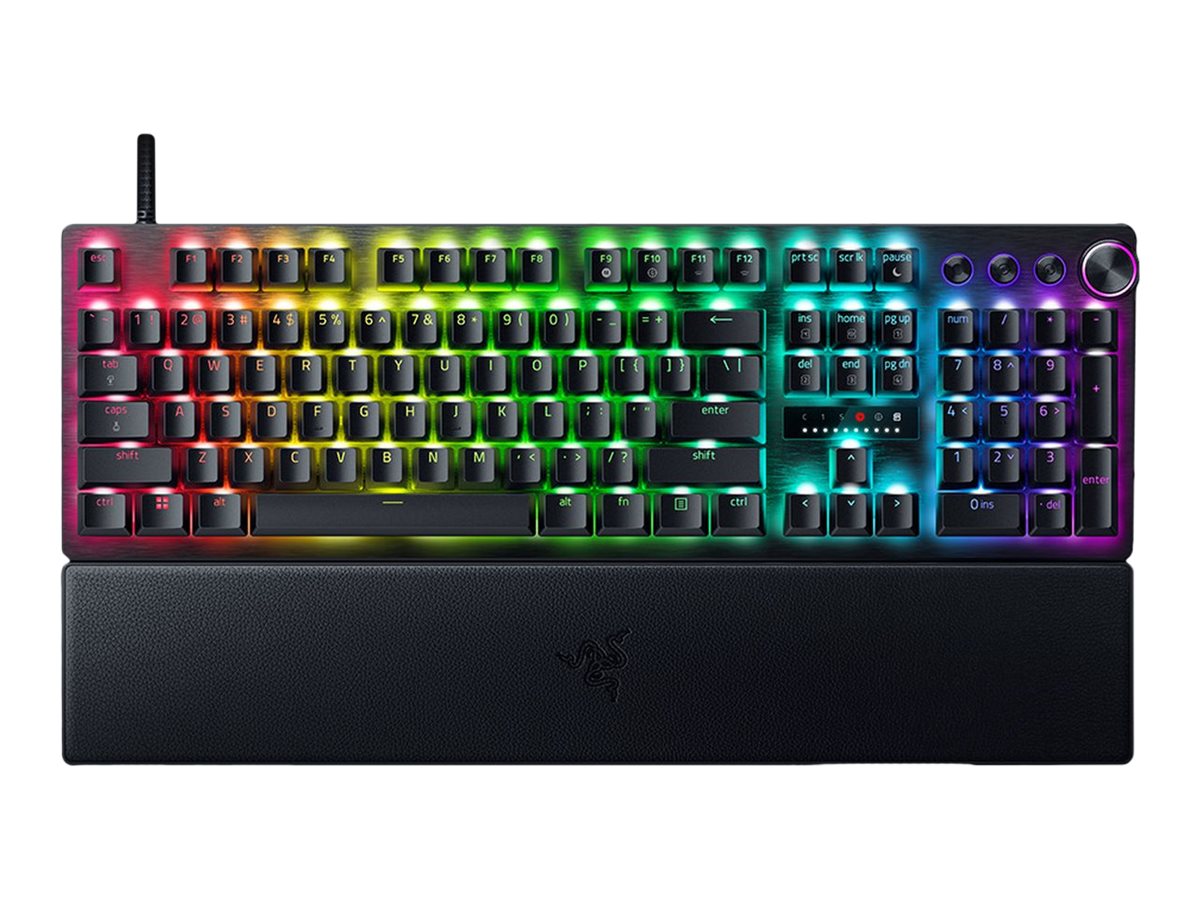
- NOTE: German keyboard layout
Razer Huntsman V3 Pro Tastatur Optisk RGB Chroma Kablet Tysk
Razer Huntsman V3 Pro - Tastatur - full size - med LED array indikator - backlit - USB-C - QWERTZ - tysk - tastkontakt: Razer Analog Optical Switches (Gen-2)
Razer Huntsman V3 Pro-tastaturet forbedrer spil- og skriveoplevelser med sin blanding af teknologi og førsteklasses design. Det er fremstillet af en 5052 aluminiumslegering og har PBT-taster med dobbeltslag, hvilket giver holdbarhed og en følelse af høj kvalitet. Tastaturets ergonomiske design, justerbare højde og RGB Chroma-baggrundsbelysning sikrer både komfort og stil. Med Razer Analog Optical Switches (Gen-2) kan brugerne nyde godt af præcision og respons. Inkluderingen af anti-ghosting-teknologi betyder, at hver kommando registreres, uanset hvor intens handlingen bliver. For dem, der sætter pris på tilpasning, er Huntsman V3 Pro udstyret med programmerbare taster, herunder makrooptagelse og mediekontrol, hvilket giver mulighed for en skræddersyet spiloplevelse. Det aftagelige USB-C-kabel forenkler ikke kun kabelhåndteringen, men forbedrer også tastaturets bærbarhed. Uanset om det er til gaming eller produktivitet, skiller Razer Huntsman V3 Pro sig ud som et alsidigt og kraftfuldt tastatur.
-
Product no 1001868578
Model RZ03-04970400-R3G1
Brand Razer USA
EAN 8887910073216
Weight 1.62 kg
-
Product information and specifications are guiding only. Without notice, these can be subject to change by the manufacturer. This applies for product images as well.
| Produktbeskrivelse | Razer Huntsman V3 Pro - tastatur full size - med LED array indikator - QWERTZ - tysk Indgangsudstyr |
| Enhedstype | Tastatur |
| Bagbelyst | RGB Chroma |
| Grænseflade | USB-C |
| Forbindelsesteknologi | Kablet |
| Indbyggede enheder | LED array indikator |
| Placering og layout | QWERTZ tysk |
| Funktion for genvejstast | Programmerbar, macro optagelses knap, n-tast-rollover, 3 medier dedikerede knapper, multifunktionel drejeknap |
| Beskyttelse | Skinnresistent, fadeproof, warp-modstandsdygtig |
| Gaming | Ja |
| Nøglekontakttype | Razer Analog Optical Switches (Gen-2) |
| Producentgaranti | 2 års garanti |
Ergonomisk design
Med sin justerbare højde har Razer Huntsman V3 Pro et ergonomisk design, der sikrer komfort under lange spilsessioner eller intensivt skrivearbejde. Tastaturets struktur, der er lavet af en holdbar 5052-aluminiumslegering, kombinerer robusthed med en elegant, førsteklasses fornemmelse.
Avanceret belysning
Oplev den livlige RGB Chroma-baggrundsbelysning, som ikke kun forbedrer æstetikken i dit gaming-setup, men også giver mulighed for at tilpasse lyseffekterne, så de passer til dit humør eller spil.
Præcision og hastighed
Huntsman V3 Pro er udstyret med Razer Analog Optical Switches (Gen-2) og leverer præcision og hastighed, så hvert tastetryk tæller med dens anti-ghosting-funktioner. Denne teknologi sikrer, at dine kommandoer udføres nøjagtigt som tiltænkt, uden at du går glip af nogen input.
Alsidige tilslutningsmuligheder
Tastaturets aftagelige USB-C-kabel forbedrer bærbarheden og reducerer rodet, mens dets kablede tilslutning via USB-interface sikrer en stabil og hurtig forbindelse uden forsinkelse.
Brugertilpasset oplevelse
Razer Huntsman V3 Pro har programmerbare taster med makrooptagelse og dedikerede mediekontroller og giver mulighed for en fuldt tilpasset spiloplevelse. Juster nemt indstillingerne for at skræddersy tastaturet til din spillestil eller dine produktivitetsbehov.
.jpg)
.jpg)
.jpg)
.jpg)
.jpg)
.jpg)
.jpg)
Razer Huntsman V3 Pro
FOR THE PRO
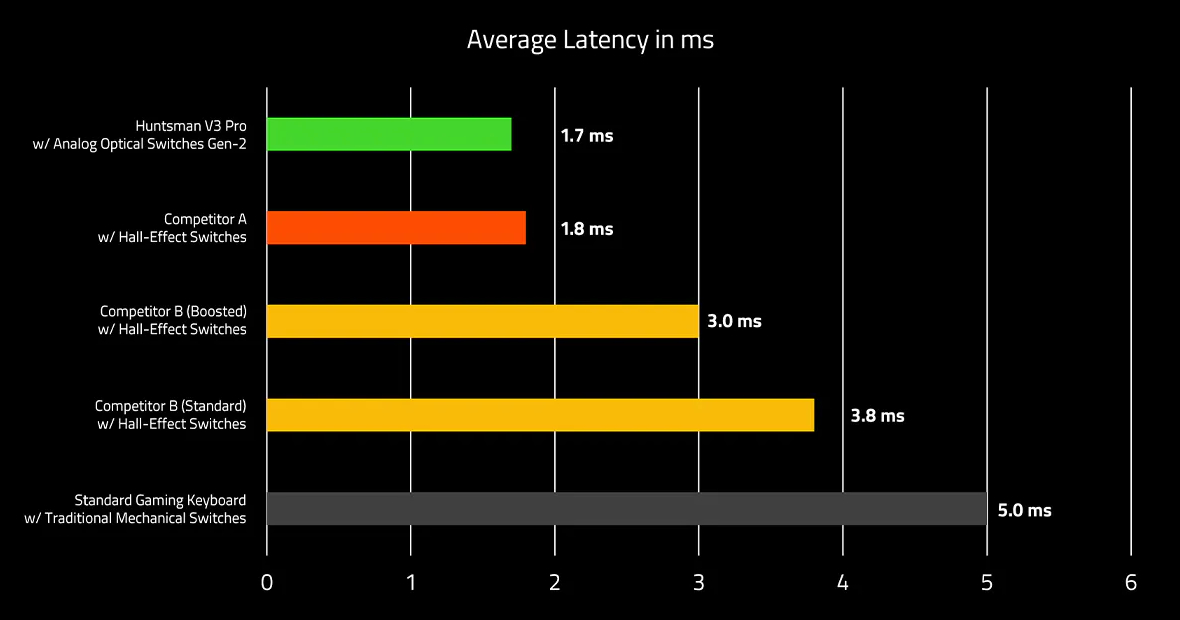
Instantly elevate your play with the champ of esports gaming keyboards — the Razer Huntsman V3 Pro. Supercharged by Rapid Trigger Mode, tap into the latest analog optical switches and execute repeated inputs at unfair speeds, complete with adjustable actuation for truly customized performance..jpg)
RAZER™ ANALOG OPTICAL SWITCHES GEN‑2
Rapid Trigger and Adjustable Actuation
Max out on precision and response with an esports keyboard featuring the most advanced switches, including Rapid Trigger for ultra-fast repeated inputs, a 0.1 to 4.0 mm adjustable actuation range, and a 100‑million keystroke lifespan..jpg)
RAPID TRIGGER MODE
SNAP TAP MODE
ADJUSTABLE ACTUATION
40 G ACTUATION FORCE
QUICK ONBOARD ADJUSTMENTS
Via an LED Array Indicator
Make precise, on-the-fly adjustments to actuation height or Rapid Trigger sensitivity with the visual aid of an onboard LED array. Save the settings to the keyboard and get access to greater customization through Razer Synapse.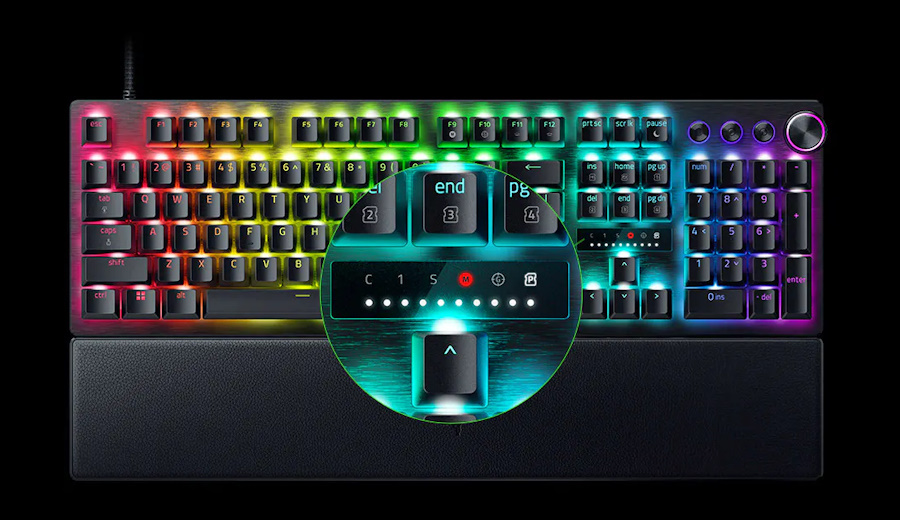
.png)
.png)
.png)
QUICK ACTUATION
ADJUSTMENT MODE
QUICK RAPID TRIGGER
ADJUSTMENT MODE
QUICK SNAP TAP
ADJUSTMENT MODE
MULTI-FUNCTION DIGITAL DIAL
& DEDICATED CONTROL BUTTONS
Convenient Control
Manage it all right at your fingertips with a dedicated dial for volume and analog switch settings, backed by a trio of buttons for media control and custom macros..jpg)
TEXTURED DOUBLESHOT PBT KEYCAPS
Greater Resilience and Feel
Made to withstand the wear and tear of intense competitive play, their shine-resistant design and fadeproof legends offer a degree of durability superior to regular keycaps..jpg)
BRUSHED ALUMINUM TOP PLATE
Top-Tier Durability
Crafted from aircraft-grade aluminum and refined with a smooth brushed metal finish, the esports keyboard’s robust casing is built to withstand frequent, intense use and is resistant to warping..jpg)
MAGNETIC FIRM LEATHERETTE WRIST REST
Extended Gaming Support
Designed to seamlessly snap to the keyboard, the leatherette wrist rest provides firm ergonomic support for your wrists — especially vital for long periods of training and competition..jpg)
.jpg)
.jpg)
.jpg)
.jpg)
.png)
.jpg)
.png)
.jpg)
.jpg)
.jpg)
.png)
.jpg)
.jpg)